Wednesday, January 19, 2011

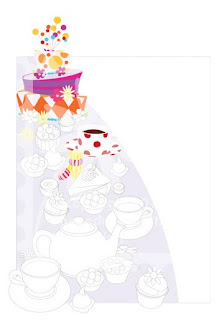
Alice in Wonderland - Mad Hatters Tea Party #3 Final


Ta-Daaaa!! This is the final piece. I am very happy with the results and look forward to starting on the next piece!!

My Process: Final Stage
After the flat color has been established, I am able to open the Illustrator file in Corel Painter. I use the magic wand to select the color areas that I want to render. After I have my marching ants running around my selection, I am free to chose my colors and paintbrushes and get painting!

I continue the process throughout the painting until I have a finished product.

Thursday, January 13, 2011

Alice in Wonderland - Mad Hatters Tea Party #2


My Process (cont'd)

Here you can see that all of the flat color is completed and I have added the rest of the characters. This gives me a really good idea of what the final piece will look like when it is finished! I'm very anxious to get started on the painting! I've had this in the "works of my mind" for the past few years and now it coming to fruition!

Next, I open the EPS file up in Photoshop. Here I make the piece its final working size, clean up anything coming from Illustrator, and get it ready to move to Painter.

Monday, January 10, 2011

Alice in Wonderland - Mad Hatters Tea Party #1


I've been working in Painter for a little while now, and finally feeling comfortable enough to start on bigger, longer projects. So, I have decided to post the progression of this piece. I have chosen to work on Alice in Wonderland's Mad Hatter Tea Party. This story has been near and dear to my heart. My mom took me to the movie theater for the first time when I was 3 years old. This movie caught my attention and left me with an appreciation for the imaginary.


My Process

First, I like to line out my design in black and white. Sometimes that is by hand with pencil, and sometimes it is by Illustrator. Here my work is in Adobe Illustrator.

After I have it all lined out, I begin to change all the shapes to flat color. If I am lining this out in pencil, I would scan it and open it in Photoshop. On a separate layer, I would paint all the areas a "rough approximate" local color that the object will be. By working this way, when I get to Painter to render the final piece, I will be able to select all of the flat shaped color and begin working it anyway I wish. Also, by making this selection, I am able to work right up to the edge of the selection.

Tuesday, April 20, 2010

Hog, Frog, Dragonfly!

This piece was inspired by a book that Scholastic published long ago -- "Small Pig." In the story, the pig decides to leave the farm and spends a short time in a swamp! Anyway, the story made a profound impression on me, so I decided to make my own little rendition!!

Wednesday, March 10, 2010

Alice in Wonderland - Caterpillar


This piece was inspired by the caterpillar scene in Alice in Wonderland. I invite you become Alice as you peek into my little "subterranean, wonderland world." I think the bright colors of the mushrooms stand out perfectly against the green and purple vines.

I have been working on this piece since Feb 23rd and just finished it. It was painted in Corel Painter using wet brush acrylics.

I am looking forward to donating a framed print to The Matthew's House here in Fort Collins as a fundraiser piece at the Spring Garden Gala in May.